Showing posts with label web. Show all posts

Tuesday, December 20, 2011

To build wget.exe with MinGW

wget is a useful command-line downloader. To build wget for the Windows platform, first install MinGW. Then, compile zlib, openssl and wget in that order. To compile zlib:


make -f win32/Makefile.gcc
cp -iv zlib1.dll /mingw/bin
cp -iv zconf.h zlib.h /mingw/include
cp -iv libz.a /mingw/lib
cp -iv libz.dll.a /mingw/lib


To compile openssl:


./Configure -DHAVE_STRUCT_TIMESPEC -DPTW32_STATIC_LIB -L/mingw/lib -lz -lpthreadGC2 -lws2_32 --prefix=/mingw threads zlib mingw
make
make test
make install


Now, build wget


./configure --prefix=/mingw --enable-threads=win32 --disable-nls --with-ssl=openssl
make
make install

Sunday, April 3, 2011

Cloud Storages for Linux

Today the trend is to put your valuable data somewhere on the Internet and access it anywhere. This is a dramatic departure from the past as our trust grows towards Internet companies. More companies are offering cloud storage services, for example, Box.net and Zumodrive. Here I show how to set up Linux to access cloud storages.


Box.net offers 5GB of free online storage for personal use, but each upload must be smaller than 25MB. Zumodrive offers 2GB free space initially, but unlike box.net you can upload any size of files using the ZumoDrive desktop application.


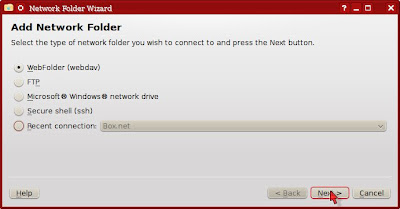
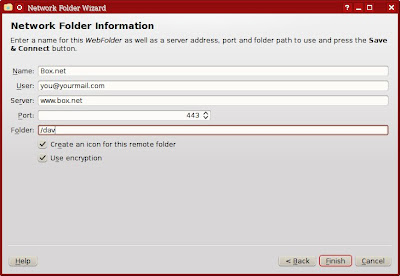
Adding a Box.net folder in KDE Dolphin


  1. Select Network from the Places panel. Then, double-click on Add Network Folder.


  2. Choose the WebFolder (webdav) and click Next.


  3. Enter information for Box.net as follows.


Setting up Zumodrive on Mint KDE edition


  1. Download the Zumodrive package for Ubuntu 8 or later (zumodrive-ubuntu8-i386-0.989.deb).
  2. The Zumodrive package depends on openjdk-6-jre, but Sun's JRE is installed in Mint, so you don't have to install openjdk-6-jre.

    However, you need install libinotifytools0, libgnet2.0-0 and libnautilus-extention1. I used Synaptics to install the missing packages.
  3. Unpack the zumodrive package into the system.

    cd /
    dpkg --extract zumodrive-ubuntu8-i386-0.989.deb .

  4. Copy /usr/share/applications/zumodrive.desktop to your Desktop folder, so you can start Zumodrive by double-clicking the icon on desktop. Optionally, right-click on the icon, choose Properties and make it executable.


  5. Now double-click on the Zumodrive icon. Once you type in your email and password, you can access Zumodrive through the ~/Zumodrive folder.

Wednesday, September 2, 2009

Flash Player 9.0.x For Slow CPU's and Windows 9x/ME

If you use an old computer and the Web seems too slow because of demanding flash videos, get Flash Player 9.0.x. Flash Plash 9.0.x is also the recommended version for Windows 98 and Windows ME. Filehippo provides download links for Flash Player 9.0.x.


Saturday, May 30, 2009

Building Seamonkey in Linux

Seamonkey is yet another Web Browser with built-in email reader and address book. Formerly known as Mozilla Suite, Seamonkey is now abandoned by the Mozilla foundation in favor of Firefox and Thunderbird. However, Seamonkey is still being developed by a few people and is in a stable, useful state. Seamonkey is sometimes omitted from Linux distributions. If you want to use Seamonkey in such distros, you can either download a pre-compiled package or compile Seamonkey for yourself. Building Seamonkey in Linux is not as complicated as it may seem.


First, you need to install the necessary compiler tools and libraries:


  • g++
  • libgtk2.0-dev
  • libidl-dev
  • libjpeg62-dev
  • libpng12-dev
  • libxft-dev
  • libxt-dev
  • make
  • zip


Next, download and unpack the seamonkey source from here. In the top-level mozilla directory, create a file, named .mozconfig, with the following contents:


mk_add_options MOZ_CO_PROJECT=suite
mk_add_options MOZ_OBJDIR=@TOPSRCDIR@/obj-i586-pc-linux-gnu
ac_add_options --host=i586-pc-linux-gnu
ac_add_options --prefix=/usr
ac_add_options --enable-application=suite
ac_add_options --enable-default-toolkit=gtk2
ac_add_options --enable-xft
ac_add_options --enable-extensions=default,-irc
ac_add_options --with-system-jpeg
ac_add_options --with-system-zlib
ac_add_options --with-system-png
ac_add_options --disable-system-cairo
ac_add_options --enable-crypto
ac_add_options --enable-optimize=-O2
ac_add_options --enable-strip
ac_add_options --enable-safe-browsing
ac_add_options --enable-url-classifier
ac_add_options --disable-gnomevfs
ac_add_options --disable-gnomeui
ac_add_options --disable-installer
ac_add_options --disable-updater
ac_add_options --disable-tests
ac_add_options --disable-debug


Then, start the compilation:


make -f client.mk build

Once compilation finishes, make a tarball of the compiled binaries:


make -C objdir/xpinstall/packager

mv objdir/dists/seamonkey*.tar.gz $HOME

Finally, install Seamonkey:


make -f client.mk install

ln -s /usr/lib/seamonkey/seamonkey /usr/bin/seamonkey

Friday, April 24, 2009

Free Online Vietnamese Dictionary

Vietnamese is one of the foreign languages that I would like to study. I searched for a good online Vietnamese dictionary using Yahoo! search. The following is what I found to be good Vietnamese dictionary sites:


  1. vndic.org
  2. Tu Dien Online
  3. Tu Dien Tim Nhanh
  4. KOBE Online Dictionary
  5. Tu Dien

Tuesday, December 2, 2008

The Art of Internet Search

The Internet has brought us vast amount of information at our fingertips. However, finding information on the Internet can be tricky sometimes. Luckily, various search engines help us find what we want. The most popular search engine is Google. Yahoo! Search is equally capable as Google. The following is a list of search engines in the order of popularity in U.S.


  1. Google
  2. Yahoo! Search
  3. Microsoft Live Search
  4. Ask
  5. AOL Search


There are also social bookmarking sites that allow you to share and search bookmarks. The following is a list of popular social bookmarking sites.


  1. Del.icio.us
  2. StumbleUpon
  3. Furl
  4. Ma.gnolia
  5. Yahoo! MyWeb


Social news sites allow you to share news stories and interesting articles. They allow you to see which news and blogs are popular everyday.


  1. Yahoo! Buzz
  2. Digg
  3. reddit.com
  4. FARK
  5. Newsvine
  6. Current
  7. Mixx

Tuesday, September 23, 2008

Forbes: How To Build A Killer Small Business Web Site

Forbes published an introductory article on building a small business web site. It gives some good tips such as:
  • Provide detailed information on your products and service. Create a good catalog with an easy-to-use search function. Let people know what you are specialized in.
  • When choosing a domain name for your site, go with direct names that are easy to remember.
  • Design your site with easy navigation in mind.
  • Establish credibility with your business personnel's background, accomplishments and head shots.
  • Respectable client list and glowing testimonials can be smart marketing tools.
  • Use graphics and Flash sparingly and only go for the highest quality.

That's not so hard to figure out on our own. But this article also gives insight on Search Engine Optimization. As you know, people use Google or Yahoo! Search to find what they want everyday. So making your site show up at the top of the search results can be critical of your business success. Search Engine Optimization techniques given by this article include:
  • Select 50 to 100 keywords most relevant to your products, services and target audience and stuff your web pages with as many of them as reasonably possible. Go to Google AdWords to see which keywords are related to each other.
  • Also include Zip code, city and region with your keywords.
  • Placement on online local business directory can be helpful. Suggestion includes Yahoo! Local, Yelp.com, Craig's List and Insiderpages.
  • Attach meta tags that include your top 20 keywords in order of importance.

Occasionally test your site design with tools like Web Trax or Offermatica.com . These tools measure click throughs.

About This Blog

KBlog logo This blog is about current events and issues concerning general population. Thanks for visiting the blog and posting your comments.

© Contents by KBlog

© Blogger template by Emporium Digital 2008

Followers

Total Pageviews

icon
Powered By Blogger